Attendance policy settings
Set your company's attendance rules — break deduction, clocking in without a schedule, several sessions a day and automatic clock-out — with each default and when to change it.
Attendance policy decides how the employee app behaves and how working hours are counted. The defaults suit most companies; change only what doesn't match how your team works.
Before you start
- Sign in as Admin or HR Manager.
- These settings apply to the whole company, not to individual employees.
Open the settings
- Go to Pengaturan (Settings) › Perusahaan & Lokasi (Company & locations).
- Scroll to the cards labelled Kebijakan kehadiran (Attendance policy).
- Tick or untick the card you want to change. Its status switches to Aktif (On) or Nonaktif (Off) and is saved straight away.
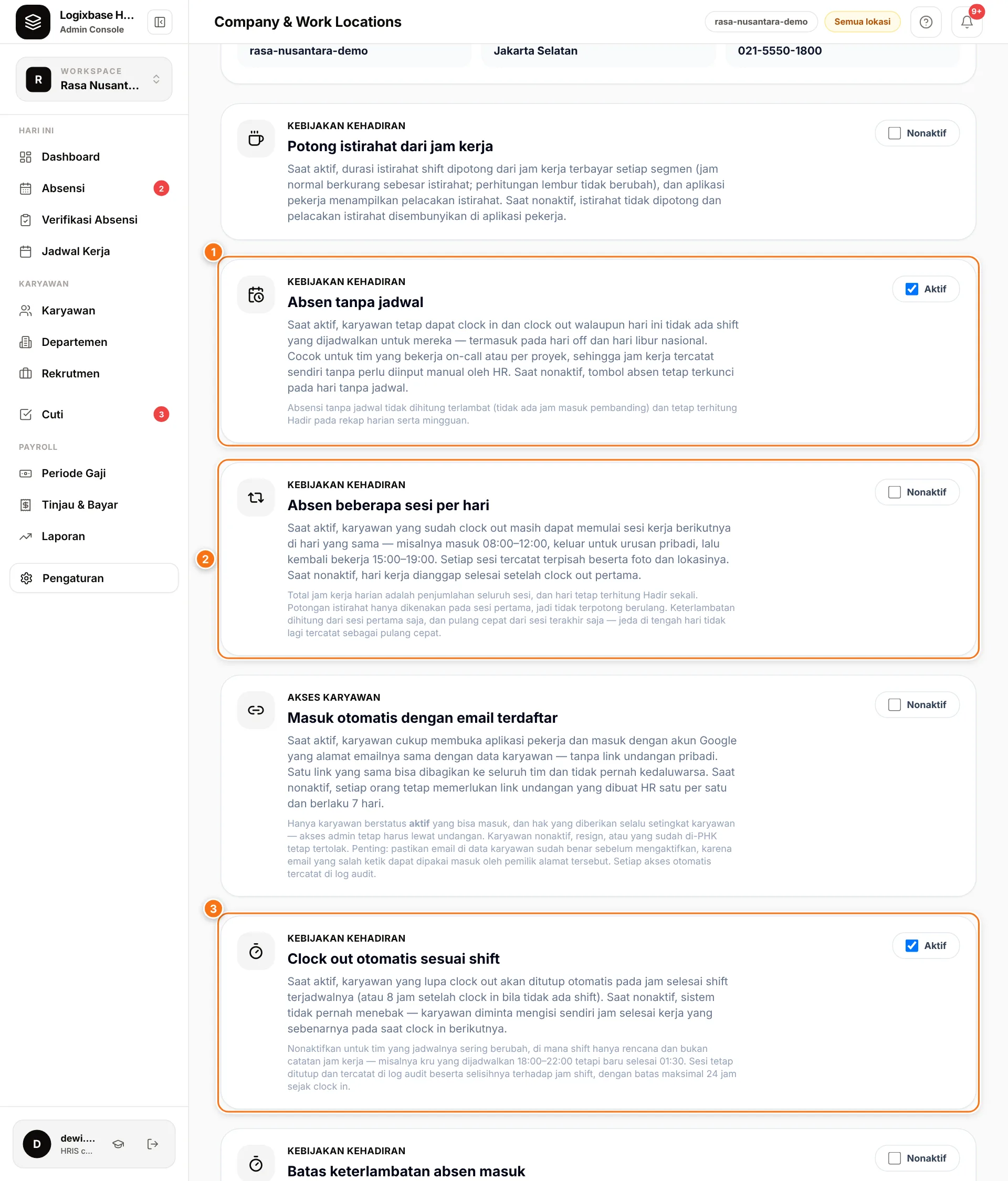
| Card | Default | Change it when… |
|---|---|---|
| Potong istirahat dari jam kerja (Deduct breaks from working hours) | Off | Breaks are unpaid, or you want employees to log breaks |
| Absen tanpa jadwal (1) (Clock in without a schedule) | On | You use the roster as a control: no schedule, no punch |
| Absen beberapa sesi per hari (2) (Several sessions per day) | Off | Your team works split shifts |
| Clock out otomatis sesuai shift (3) (Automatic clock-out at shift end) | On | Rosters are only a plan and real finishing times vary |
Deduct breaks from working hours
Default: Nonaktif (Off).
- When Aktif, the shift's Istirahat (break) duration is deducted from working hours once per day, on the first session. Hourly employees' pay follows; overtime calculation does not change.
- Aktif also shows a Mulai istirahat (Start break) button in the employee app. When Nonaktif, it is hidden.
- The deduction is the break length set on the shift, not the break the employee logged. Days without a shift are not deducted.
- A shift's Potong istirahat dari gaji (deduct break from pay) is skipped while this card is Aktif, so a break is never deducted twice.
Clock in without a schedule
Default: Aktif (On).
- When Aktif, employees can clock in and out with no shift that day, including days off and national holidays. Good for new hires not yet rostered, on-call teams, or project work.
- Unscheduled punches are never late (there is no start time to compare with) and still count as Hadir (present). Without a shift they also get no overtime calculation or break deduction.
- When Nonaktif, the clock buttons are locked on unscheduled days and employees see Hari Off (day off). Choose this when unscheduled shifts must not be recorded.
Several sessions per day
Default: Nonaktif (Off).
- When Nonaktif, the day ends at the first clock-out and Beranda (Home) shows Shift hari ini selesai (today's shift is done).
- When Aktif, an employee who has clocked out can start another session the same day with Mulai Sesi 2 (Start session 2), then session 3, and so on. Example: 08:00–12:00, out for an errand, back 15:00–19:00. Each session has its own selfie and location.
- Total hours are the sum of all sessions and the day counts as Hadir once. Lateness is measured on the first session, early leave on the last, and the break is deducted only once.
Leave it Nonaktif if your team doesn't work split shifts: there, leaving mid-day and coming back is an early-leave signal worth noticing.
Automatic clock-out at shift end
Default: Aktif (On). This card decides what happens when someone forgets to clock out. Sessions are not closed in real time at the shift's end: an open session stays open until the employee clocks in again on a later day, or until HR fixes it.
- When Aktif, the system suggests the shift's end time as the finishing time, or 8 hours after clock-in when there is no shift. At their next clock-in the employee sees Lupa absen pulang? (Forgot to clock out?) with that time filled in, and taps Tutup sesi & lanjut (Close session & continue) or corrects the time first.
- When Nonaktif, the system never guesses: the field is empty and the employee must enter the time they really stopped working.
- Either way, the finishing time can be at most 24 hours after clock-in, and the closing is recorded in the audit log with its difference from the shift end.
Turn it off for teams whose roster is only a plan, for example a crew scheduled 18:00–22:00 that really finishes at 01:30.
Optional features
Three more cards only work once the feature is enabled for your company. They are optional features; contact us to enable them.
- Pelacakan sesi & istirahat (Session & break tracking): break start and end are recorded on the server with a location, so HR sees real break lengths. It does not change pay.
- Masuk otomatis dengan email terdaftar (Sign in with a registered email): active employees sign in with the Google account matching their employee record, without a personal invite link.
- Pelacakan kunjungan (Kunjungan) (Visit tracking): field staff record arrivals at customer sites with time, location and notes.
Until the feature is enabled, ticking these cards changes nothing in the employee app. A mandatory work note at clock-in and overtime approval are also available as optional features.
Common problems
- Employees don't see a break button. Turn on Potong istirahat dari jam kerja.
- An employee can't clock in and sees "Hari Off". They have no shift that day and Absen tanpa jadwal is Nonaktif. Schedule a shift or turn the card on.
- "Gagal menyimpan. Coba lagi." (Failed to save). Only Admin and HR Manager can change these settings.
Next steps
Need visit tracking, overtime approval or another optional feature? Chat with our team to enable it for your company.