Leave types and balances
Set up leave types based on Indonesian labour law in a few clicks, set tenure and carry-over rules, then track and adjust every employee's leave balance.
Clear leave rules mean fewer disputes. Once leave types are set up, employees request leave from their phone, the system checks their balance and eligibility, and you just approve.
Before you start
- Admin and HR Manager can create leave types and adjust balances. Managers and Finance can only view them.
- New workspaces usually come with four basic leave types: Cuti Tahunan (annual leave, 12 days, after 12 months of service), Cuti Sakit (sick leave, 14 days, approved automatically, doctor's letter required), Cuti Melahirkan (maternity leave, 90 days, women only) and Cuti Ayah (paternity leave, 3 days, men only).
Doctor's letters from the app
For a leave type with Wajib lampirkan surat dokter (doctor's letter required) ticked, employees attach a photo or PDF of the letter straight from the app when they request it. HR opens it with Lihat lampiran (View attachment) under Cuti › Persetujuan (Leave › Approvals). The default sick leave is approved automatically; tick Perlu persetujuan (Needs approval) if you want to review requests first.
Add leave types from a template
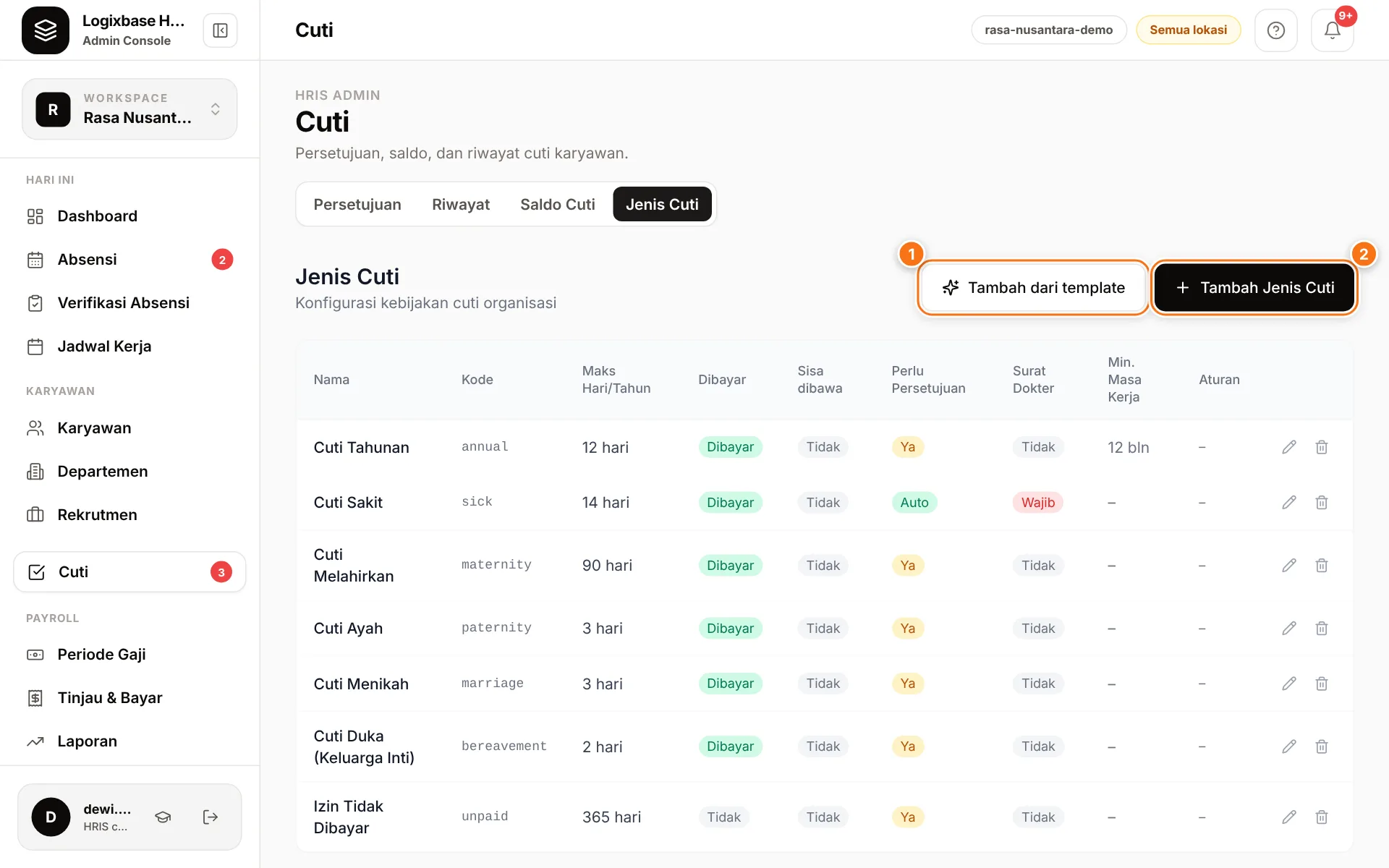
- Go to Cuti (Leave) › Jenis Cuti.
- Click Tambah dari template (1) (Add from template). A list of leave types under Indonesian labour law appears with their legal basis — for example annual leave, maternity leave, marriage leave, bereavement leave and unpaid leave (Izin Tidak Dibayar).
- Click Pakai (Use) next to the type you need. Types you already have are marked Sudah ada (already exists).
- Review the details, adjust if needed, then click Simpan (Save).
Template numbers are the legal minimums; your company may give more. Some templates include a note, for example on adjusting the number of days for companies with a six-day week.
Add your own leave type
Click Tambah Jenis Cuti (2) (Add leave type) and fill in:
- Nama (name) and Maks hari per tahun (max days per year): each employee's yearly allowance in working days.
- Min. masa kerja (bulan) (minimum tenure, months): enter 0 if employees qualify immediately.
- Untuk gender (for gender): Semua karyawan (all employees), Hanya laki-laki (men only) or Hanya perempuan (women only).
- Dibayar (Paid): marks the leave as paid. This flag doesn't change pay calculations by itself; the number of unpaid leave days is shown in Attendance verification.
- Perlu persetujuan (Needs approval): when unticked, requests are approved automatically.
- Wajib lampirkan surat dokter: see the note above.
- Sisa cuti dibawa ke tahun berikutnya (carry unused days into next year): Tidak — sisa hangus di akhir tahun (no, unused days expire at year end) or Ya, dengan batas hari (yes, up to a limit), then fill in Maksimal hari yang dibawa (maximum days carried).
The leave type code is generated from the name and can be changed under Lanjutan (Advanced).
How balances work
- When you add an employee, the system creates this year's balance for every active leave type that matches their gender. If, as of 1 January this year, they hadn't met the minimum tenure, the allowance is 0 — annual leave, which requires 12 months, is the typical case.
- Every 1 January the system opens the new year's balance with the full allowance, plus last year's unused days if carry-over is on (up to its maximum).
- When an employee requests leave, the system checks their tenure since their join date and their remaining balance. Requests beyond the remaining balance are refused.
- Leave days are counted from the employee's working days by their schedule (or their workweek pattern where no schedule exists yet), excluding holidays in the Hari Libur (Holidays) calendar. A six-day worker's Saturday counts; a national holiday does not, unless their brand is marked as staying open.
- Employees can request leave up to 30 days back (a sick day reported afterwards, say). A request for a date that has passed always needs approval, even when its leave type is approved automatically. Dates inside a pay period that is already paid or locked are refused.
Existing staff and new leave types
- After you enter existing employees, check their Saldo Cuti (Leave balance). Someone who reached 12 months during this year may still show 0 annual leave; adjust it if needed.
- A leave type created later only gives existing employees a balance from the next 1 January. Set up leave types before adding employees; if a new type must apply this year, contact us.
View and adjust balances
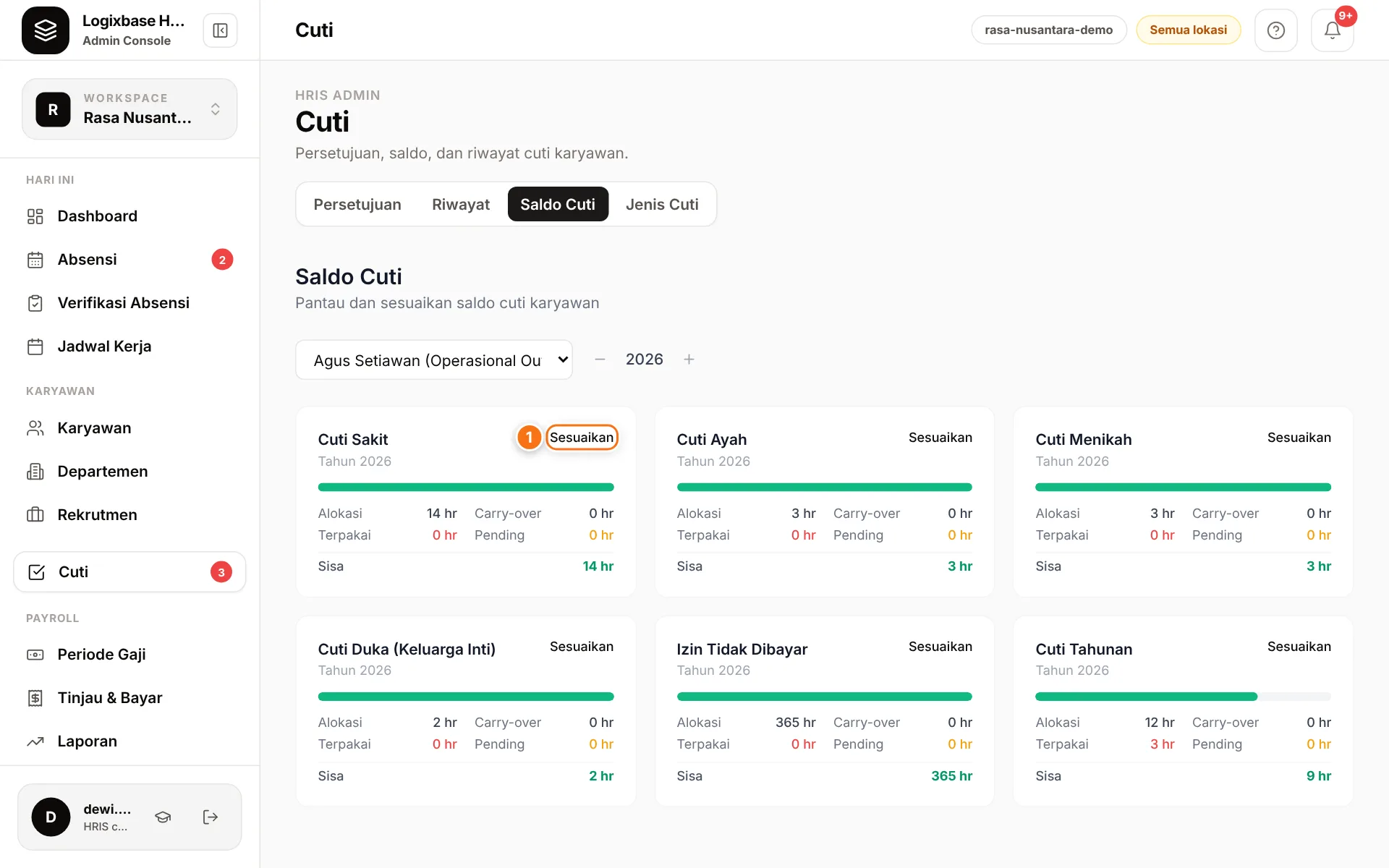
- Go to Cuti › Saldo Cuti.
- Choose the employee and year. Each leave type shows Alokasi (allocated), Carry-over, Terpakai (used), Pending and Sisa (remaining).
- Click Sesuaikan (1) (Adjust) on the leave type you want to change.
- Change Hari Alokasi (allocated days) or Carry-over (hari) (carry-over days), explain why under Catatan (Note), then click Simpan.
Every adjustment is recorded in the audit log, including the before and after values. To record leave already taken before you started using Logixbase, reduce Hari Alokasi by that many days and explain it in Catatan. The same balances can also be viewed and adjusted from the Cuti & Izin (Leave) section of the employee's profile.
Next steps
Need richer leave rules, such as gradual balances for new hires or approval by department heads? They are part of the optional leave policy; chat with our team to enable it.