Approving leave
Approve or reject leave requests from one queue, see who is allowed to decide, and what happens automatically to balances, attendance and employee notifications.
Employees request leave in the app; you decide from a single queue. Once approved, the balance is deducted and those days are recorded as leave in attendance. No manual recap needed.
Who can approve
- Admin and HR Manager: every request.
- Manager: only requests from employees in their own department, which is why a Manager account needs a department (see Team and access).
- Finance does not approve leave.
New requests trigger a notification for Admins and HR Managers. The count also appears on the Cuti (Leave) menu and in the Perlu Tindakan (Needs action) box on the dashboard.
Approve or reject
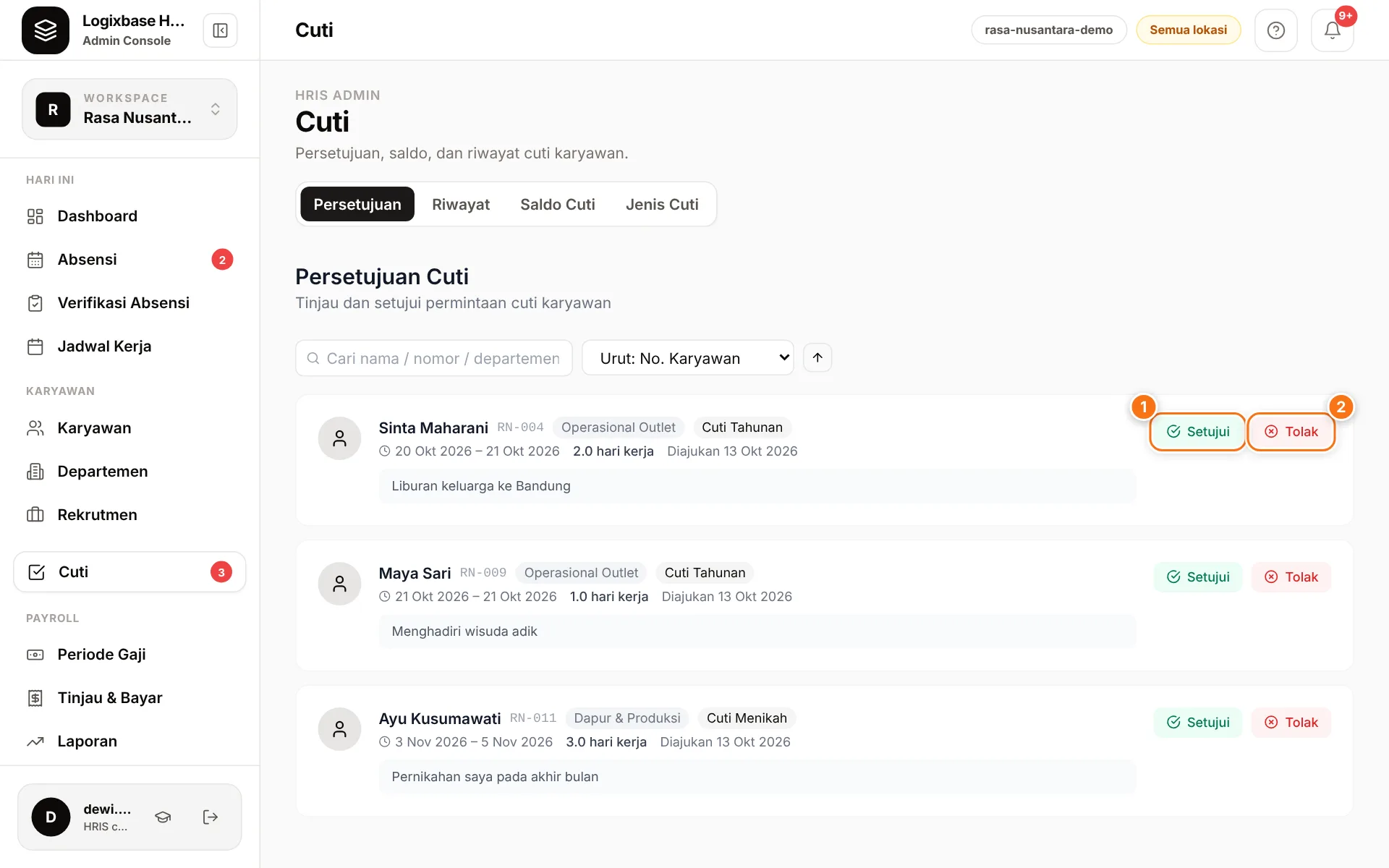
- Go to Cuti › Persetujuan (Approvals).
- Review each request: name, department, leave type, dates, number of working days, submission date and reason. Use search or sorting when the queue is long.
- Click Setujui (1) (Approve) to approve.
- Or click Tolak (2) (Reject), fill in Alasan Penolakan (reason for rejection, at least 5 characters), then click Tolak in that dialog.
You can also decide straight from the Cuti menunggu persetujuan (Leave awaiting approval) widget on the dashboard.
Approvals can't be undone
Setujui acts immediately without a confirmation, and approved leave cannot be cancelled in the app, not even by the employee. Check the dates before you approve.
What happens after a decision
- Approved: the days move from Pending to Terpakai (used) in Saldo Cuti (Leave balance). The days taken from the balance — the employee's working days by their schedule, holidays excluded — are recorded as Cuti (Leave) in attendance, so they don't count as absences. The employee receives a Cuti Disetujui (Leave approved) notification.
- Rejected: the held days return to the balance, and the employee receives a Cuti Ditolak (Leave rejected) notification with your reason.
- While a request is pending, the employee can cancel it themselves in the app.
- Leave types without Perlu persetujuan (Needs approval) ticked are approved automatically and never reach this queue. The rules are in Leave types and balances.
Every Setujui or Tolak decision is recorded in the audit log.
History
Cuti › Riwayat (History) lists every request with the status Menunggu (Pending), Disetujui (Approved), Ditolak (Rejected) or Dibatalkan (Cancelled). Filter by status, search by name, number or department, and sort the columns. Leave history can't be exported yet.
Common problems
- "Saldo tidak mencukupi (balance berubah)" (insufficient balance, balance changed) when approving. The employee's balance changed since they submitted. Check Saldo Cuti and use Sesuaikan (Adjust) if it really needs topping up.
- A Manager can't approve a particular request. That employee belongs to another department.
- The leave range includes a public holiday. Holidays in the Hari Libur (Holidays) calendar are not counted, unless the employee's brand is marked as staying open that day. Days off in the employee's schedule are not counted either, and a six-day worker's Saturday is. Check the number of days before approving.
- Leave for dates that have passed. Employees can request up to 30 days back — a sick day reported afterwards, say. Such a request always goes to the approval queue, even for leave types that are normally approved automatically. Once approved, that day's attendance (for example one recorded as absent) becomes Cuti — any note HR left on that day is kept — and a pay period already calculated asks for Hitung Ulang (Recalculate). Dates inside a pay period that is already paid or locked are refused: record it as an attendance correction, or unlock the period first.
Optional features
Team leave approval from the employee app, a family-relationship choice for bereavement leave, and approval by department heads are part of the optional leave policy. Optional feature; contact us to enable it.