What is Logixbase HRIS?
Logixbase HRIS runs selfie + GPS attendance, leave, and payroll for businesses with several brands, outlets, or sites — from one dashboard and a phone app for employees.
Logixbase HRIS is an HR system for Indonesian businesses that run several brands, outlets, or work sites — F&B, retail, warehouses, and field teams. Employees clock in from their phone with a selfie and GPS, HR handles leave and attendance in one dashboard, and payroll is calculated straight from the hours that were recorded. The result: attendance you can trust, fewer payroll disputes, and no more month-end rework from WhatsApp groups and spreadsheets.
Who it is for
- Business owners who want to know who is present at which outlet without calling around.
- HR teams tired of rebuilding attendance from photos, chats, and Excel every month.
- Outlet or warehouse managers who approve leave and fix attendance for their team.
- Finance teams who need payroll figures they can stand behind, including BPJS and PPh 21.
- Employees who want to clock in quickly, request leave, and see payslips on their own phone.
It pays off most when your people move around: one person works for two brands in a day, or a team rotates between locations.
Two apps, one system
| Admin app | Employee app | |
|---|---|---|
| For | Owners, HR, managers, finance | Every employee |
| Address | hris.logixbase.com | worker.logixbase.com |
| Opens in | A browser on a laptop or phone | A phone browser — no Play Store or App Store |
| Sign in with | A Google account | A Google account |
| Used for | Dashboard, attendance, schedules, leave, payroll, reports, settings | Clock in/out with selfie + GPS, attendance history, schedule, leave, payslips |
The employee app is a web app (PWA). Employees open the invite link from HR and sign in with Google. To open it faster, they can add it to their home screen through the Pasang HRIS Worker (Install HRIS Worker) prompt (on iPhone: the Share button, then Add to Home Screen). See how employees sign in and install the app.
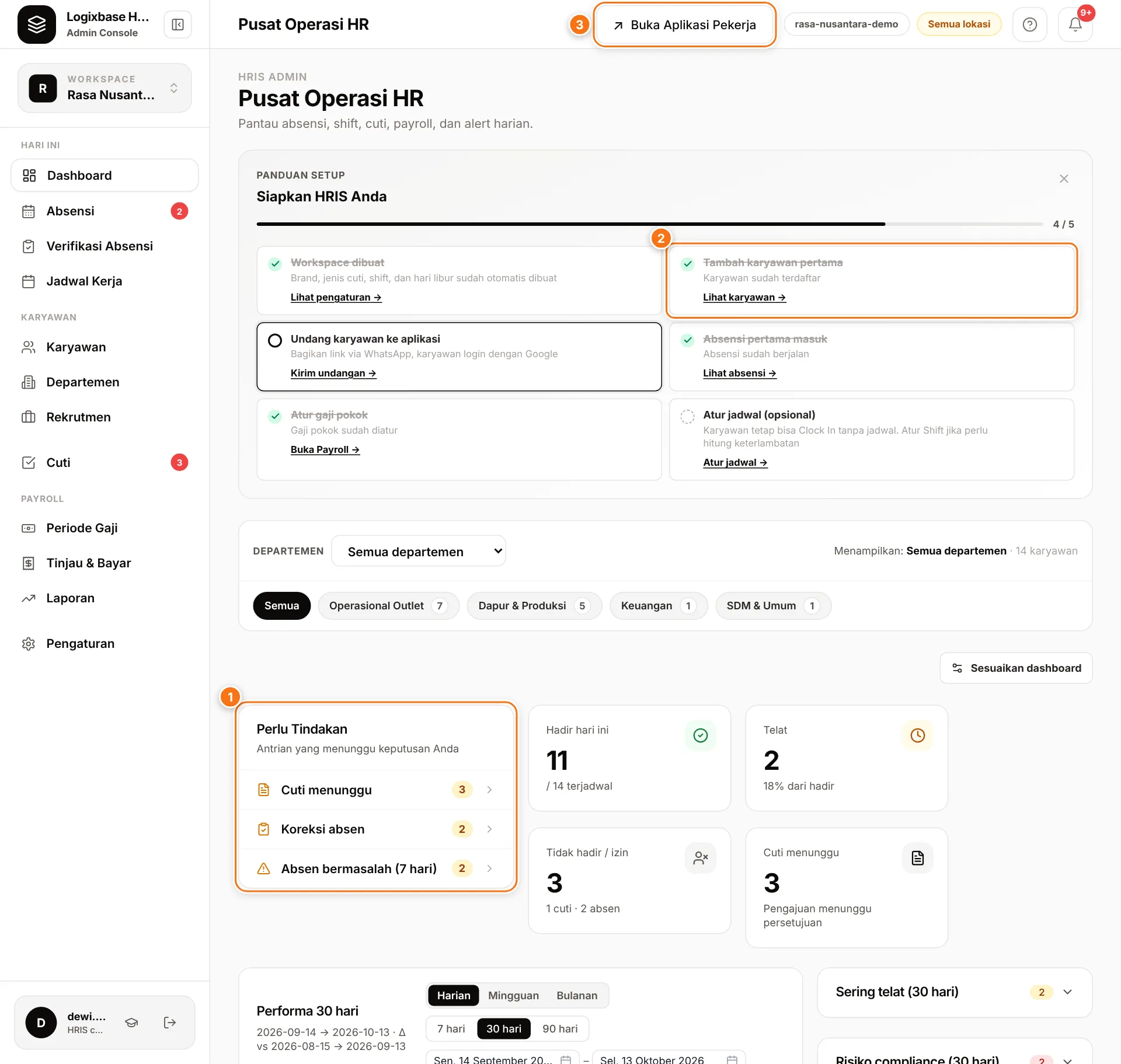
After you sign in, the Dashboard shows what needs your attention today in the Perlu Tindakan (Needs action) card (1). A new workspace also gets a setup guide, starting with Tambah karyawan pertama (Add your first employee) (2). The Buka Aplikasi Pekerja (Open employee app) button (3) opens the employee app.
Core modules
| Module | What you get | Guide |
|---|---|---|
| Employees & team | Employee records, bulk import, app invites, role-based access | Manage employees |
| Selfie + GPS attendance | Clock in/out from a phone, work for several brands in one day, daily to monthly views | Monitor attendance |
| Work locations & geofence | Location pins with a radius; clock-ins outside the radius are flagged for HR | Work locations |
| Schedules & shifts | Shift templates, weekly schedules, copy last week's schedule | Shifts & schedules |
| Leave & holidays | Leave types, balances, approvals, national holiday calendar | Set up leave |
| Payroll | Pay periods, salary components, automatic BPJS & PPh 21, payslips | Run payroll |
| Reports | Attendance, working hours, brand allocation, and payroll; CSV export for attendance, working hours, and payroll | Reports |
| Communication | Info banners and polls in the employee app | Communication |
| Recruitment | Job openings, application forms, and a careers page | Recruitment |
| Third-party access | A view-only attendance dashboard for outside parties, such as a client or accountant | Third-party access |
How a typical month works
- Set up once. Fill in your company profile and work location, add employees, and share their invite links over WhatsApp. Follow the admin setup guide.
- Every day, employees clock in from their phone. They tap Clock In Sekarang (Clock in now), take a selfie, and GPS is recorded when available. Attendance shows up right away on the Dashboard and in Absensi (Attendance). No signal? The clock-in is saved on the phone and sent automatically once the phone is back online and the app is open.
- During the month, HR keeps things clean. Approve or reject leave in Cuti › Persetujuan (Leave › Approvals), review out-of-radius clock-ins in Absensi › Absen Bermasalah (Flagged attendance), and handle employees' fix requests in Koreksi Absensi (Attendance corrections).
- At the end of the period, run payroll. Create a pay period, click Hitung (Calculate), check hours in Verifikasi Absensi (Attendance verification), pay salaries from your bank, then Tandai Dibayar (Mark as paid) and Kunci (Lock) the period.
- Employees see their payslip. The slip appears under Slip Gaji (Payslip) in the employee app, and the PDF can be downloaded once the period is marked as paid.
What makes it different
- Several brands in one day. Employees pick a brand when they clock in and can Ganti Brand (Switch brand) mid-shift. Every work session is recorded against a brand, and hourly rates can be set per brand and per employee. Cross-brand payroll and reporting are switched on with our team. Learn about multi-brand.
- A geofence that records instead of blocking. Clock-ins outside the radius or without GPS are still accepted, so nobody is stuck at the door because of a weak signal. They are flagged with the distance and selfie so HR can review them.
- Payroll from finished attendance. Payroll is calculated from work sessions that have been closed, not from manual tallies. If attendance changes after a period was calculated, payment is held until you click Hitung Ulang (Recalculate). Once a period is locked, its attendance is frozen too.
- An employee app with nothing to install. A link and a Google account are all it takes, which suits teams with all kinds of phones.
Next steps
Try Logixbase HRIS free with no credit card — or let our team prepare your workspace and help move your employee data in.